
User Experience Design tips#1
💡 UI Border Width Cheatsheet
Border is a subtle yet essential part of UI design. It is used to define structure and separation between individual sections and content elements. We typically rely on our gut feeling when choosing a border width, but having a nice visual reference can be very helpful, and the eBay team created one. The team proposes 3 border widths:
1️⃣ Subtle (0.5px)Subtle border width is reserved for transition between distinct sections (like a transition between the body section of a screen and a navigation menu). A subtle border acts as a nice visual bridge between the two sections.

2️⃣ Default (1px)Default border width is used to illustrate the boundary of components and divide content. It is by far the most used border width in UI design.
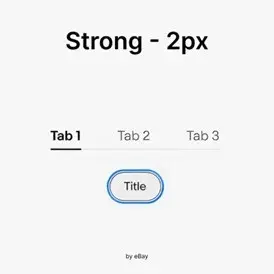
3️⃣ Strong (2px)Strong borders are used to emphasize elements that primarily use borders for their structure (like tab navigation). It’s mainly used to highlight a particular element in the hierarchy or sequence.


Comments